
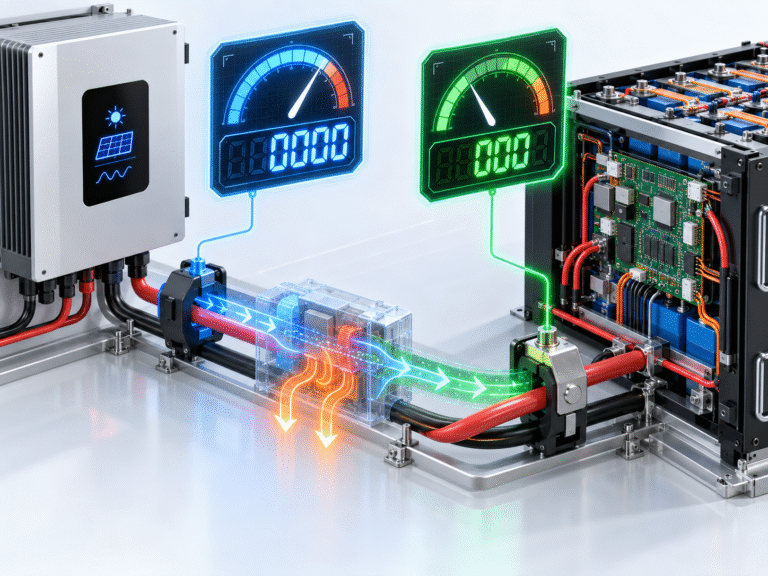
Charger Output Current Is Not Always Battery Current
Consider a hybrid inverter that converts solar or grid power into a DC bus. Some of that DC power may go into the battery, while some supplies internal electronics or DC-side loads.
If the inverter reports the current delivered by its power stage while the BMS measures current directly entering the battery pack, the two values do not have to be identical.
For example, the charger might produce 80A equivalent at one point in the circuit while the battery receives 75A after other DC consumption and conversion effects are considered.
The exact architecture depends on the inverter.
Net Battery Current Is the Most Important Battery-Side Value
The BMS typically measures current flowing through the battery’s own current sensor. This may be a shunt or Hall-effect device located inside the battery.
If current flows into the battery, the BMS records charging current. If current flows out, it records discharge current.
For estimating SOC and battery energy flow, this net battery current is usually more relevant than the charger’s internal power-stage current.
However, even BMS measurements have tolerance and calibration limits.
Loads Can Explain Large Differences
Suppose the inverter is producing the equivalent of 80A of charging power while DC loads consume the equivalent of 20A. The battery may receive only around 60A net.
The inverter display may still emphasize 80A charger output, depending on its interface, while the BMS displays approximately 60A entering the battery.
This can look like a 20A measurement error even though both devices are showing valid values from different locations.
Always check whether loads are operating during the comparison.
Use Power Flow to Test the Numbers
A useful way to check plausibility is to calculate battery power.
Suppose the BMS reports:
Battery voltage = 53V
Battery charging current = 62A
Approximate battery charging power is:
53V × 62A ≈ 3.29kW
If the inverter battery-power screen shows around 3.3kW, the BMS reading is probably consistent.
If the inverter instead reports 80A but also only 3.3kW battery power, the 80A value may represent a different internal current rather than true battery current.
Power is often the easiest way to reconcile confusing current displays.
AC Current and DC Current Must Never Be Compared Directly
Another common mistake is comparing inverter AC input current with battery DC current.
For example, a charger might draw 15A from a 230V AC supply while delivering around 60A to a 51.2V battery. Those values are not supposed to match.
The AC side operates at a much higher voltage, so it needs much lower current for similar power.
When comparing current readings, first confirm that both measurements are on the same electrical side of the converter.
Battery Voltage Changes the DC Current
Even if charging power remains constant, battery current changes as voltage changes. At 52V, 4kW corresponds to about 77A. At 56V, the same 4kW corresponds to only around 71A.
Therefore, an inverter displaying a fixed charging power can show a changing battery current over the charge cycle.
If one screen updates power instantly while another calculates current from a slower sample, temporary differences can appear.
Display Update Rates Matter
An inverter may refresh its screen every one second, while the BMS application updates every three or five seconds. Solar power and loads can change significantly during that interval.
For example, a cloud reduces PV output. The inverter immediately shows 50A while the phone app still displays the previous 75A reading for several seconds.
Both readings can be correct for the moments they were sampled.
When comparing devices, observe them over a stable period rather than taking one screenshot.
Filtering Makes Displays Look Smoother
Electrical current can fluctuate rapidly. If every instantaneous change were shown on the screen, the number would constantly jump.
Manufacturers therefore apply software filtering or averaging. One device may display a one-second average while another uses a longer average.
As a result, a rapidly changing system can show different values even when both sensors are reasonably accurate.
This is especially noticeable with fluctuating solar production or pulsed loads.
Sensor Type Can Affect Accuracy
BMS and inverter current measurements may use Hall-effect sensors or shunts. Each technology has advantages and limitations.
A shunt measures voltage drop across a precise resistance. Hall-effect sensors detect magnetic fields around the conductor and can provide electrical isolation.
Neither method is perfectly accurate under every condition. Sensor tolerance, temperature and calibration can create small differences between devices.
A discrepancy of one or two amps at high current is very different from a persistent 20–30A discrepancy.
Zero Offset Can Create Errors at Low Current
Suppose the battery is actually charging at only 2A, but the BMS sensor has a small zero offset. It may display 0A or 3A.
At 100A this error would be insignificant. At 2A it becomes a large percentage.
This is why comparing devices at very low current is not the best way to evaluate calibration. Use a stable moderate current where measurement resolution is adequate.
Clamp Meters Add Another Measurement Source
A DC clamp meter can be useful because it measures current externally without disconnecting the cable. However, it also has its own accuracy limitations and must be zeroed correctly.
The meter should clamp around only one conductor, not both positive and negative cables together. If both are inside the clamp, their magnetic fields can cancel and produce a misleading reading.
For high-current ESS troubleshooting, use a meter rated for the expected DC current and follow safe working procedures.
Measure the Correct Cable
Parallel battery systems create another common mistake. Suppose four battery modules connect to a common busbar. A clamp meter placed on the inverter’s main battery cable measures total bank current, while each BMS reports only the current through one module.
If the inverter cable shows 80A and one battery BMS shows 20A, both can be correct because four modules may each be carrying approximately 20A.
Always identify whether the measurement represents one module or the complete battery bank.
Master BMS Values Can Be Aggregated
In multi-battery systems, the master BMS may report total bank current or only the current measured by the master module depending on architecture.
Do not assume every battery display uses the same convention.
For remote troubleshooting, ask whether the current reading comes from an individual pack, master controller or inverter.
This is especially important when one module appears to be charging at a much different rate from the others.
Current Direction Can Also Be Reversed
Some devices define charging current as positive and discharge as negative. Others use the opposite sign convention.
For example, the inverter may display: +50A
for charging while the BMS shows: −50A
for the same event.
The magnitude agrees, but the sign is reversed by software convention.
Before diagnosing reversed current-sensor wiring, confirm the manufacturer’s definition of positive and negative current.
SOC Calculation Depends Heavily on BMS Current
The BMS commonly uses coulomb counting to estimate SOC. If its current sensor has a significant calibration error, SOC can drift over time.
For example, if the battery actually receives 100Ah but the BMS records only 90Ah, the displayed SOC may gradually become inaccurate.
This is one reason large persistent current-measurement errors deserve attention even if charging itself appears to work.
Inverter Current Accuracy Also Matters for Energy Management
An inverter that mismeasures battery current can affect its power-flow display, but closed-loop BMS data may still keep the battery protected.
In systems that rely heavily on inverter-side SOC or energy calculations, inaccurate current sensing can also influence scheduling.
For professional ESS commissioning, measurement data should be checked against known reference instruments when behavior seems unreasonable.
Example: A Difference Explained by Loads
Suppose the inverter shows:
Charger output = 80A equivalent
Battery voltage = 54V
The BMS shows:
Battery charging current = 60A
A DC load connected to the same bus consumes:
approximately 20A
The difference is now easily explained. The charger supplies both the battery and the DC load.
No sensor fault is required.
Example: A Difference That Deserves Investigation
Now suppose there are no DC loads and the system has one battery. The inverter shows 100A continuously, the BMS shows 60A and a calibrated clamp meter shows 61A.
The BMS and external meter agree closely, while the inverter differs by almost 40A. This is strong evidence that the inverter value represents a different parameter or has a configuration/calibration issue.
Check the inverter manual before assuming the battery is refusing the missing 40A.
Another Example: The BMS Shows More Current Than the Inverter
This can also happen. Suppose the solar inverter contributes 50A and an external AC charger contributes another 30A directly to the battery bus.
The inverter may display only its own 50A contribution, while the BMS sees the total battery current of around 80A.
The BMS is not over-reporting. It measures current from all charging sources combined.
This is especially important when multiple chargers share one battery bank.
Communication Data Can Lag Behind Local Measurements
A BMS may measure current internally at high speed but transmit data to the inverter over CAN or RS485 at a slower interval. The inverter can therefore display slightly older battery information.
Under steady charging, the difference is negligible. During rapid load changes, it becomes more visible.
Logging several seconds of data is more useful than comparing two displays at one instant.
Cable Voltage Drop Does Not Directly Create Current Disagreement
Cable resistance affects voltage and the resulting power flow, but two sensors measuring the same series conductor should still see essentially the same current.
If two devices claim dramatically different current while measuring the same physical branch, cable voltage drop alone is not the explanation.
Look instead at measurement location, sensor calibration, averaging or whether one reading is calculated rather than directly measured.
Some Displays Calculate Current from Power
Not every inverter display uses a dedicated current sensor for every value. A device may calculate current using:
Current = Power ÷ Voltage
If power and voltage are rounded, the resulting displayed current can differ from the BMS sensor reading.
For example, 4.0kW divided by a rounded 52V gives a different result from using the precise internal values.
Small differences are therefore expected.
A Practical Comparison Method
For the cleanest test, choose a period with stable charging, minimal load variation and only one charging source active. Record battery voltage, inverter battery power, inverter battery current, BMS current and a suitable external current measurement if available.
Then calculate:
Battery Power ≈ Voltage × Current
If the BMS current and external measurement agree while the power calculation also makes sense, the battery-side measurement is probably reliable.
If all three readings disagree significantly, more detailed investigation may be required.
Do Not Recalibrate Sensors Without Evidence
Some BMS tools allow current-sensor calibration. This should not be changed simply because two screens differ.
Incorrect calibration can create SOC errors and protection problems. First confirm measurement location and compare against an appropriate reference instrument.
Calibration should follow the manufacturer’s technical procedure.
For Distributors: Request the Whole Power-Flow Screen
When a customer says, “Your battery says 60A but my inverter says 80A,” ask for more than the two current numbers. Request battery voltage, battery power, PV power, grid power, load power, number of battery modules and all charging sources.
The difference can often be explained immediately once the complete energy flow is visible.
This approach prevents unnecessary replacement of a battery or inverter that is actually operating normally.
Why This Matters for Warranty Analysis
A customer may claim that the battery was charged above its allowed current based on one inverter screenshot. If the BMS log shows a lower current, the two measurements need to be reconciled before conclusions are made.
Likewise, BMS logs should not automatically override all other evidence if sensor calibration is questionable.
Professional after-sales analysis should use multiple data points and understand where each measurement originates.
Conclusion
When an inverter and LiFePO4 BMS display different charging currents, the first question should not be:
Which device is broken?
Instead ask:
Where is each current being measured, and does it represent the same power flow?
Differences can result from active loads, multiple chargers, parallel battery modules, update rates, averaging, sign conventions and sensor tolerance. Small differences are normal, while large persistent discrepancies under stable conditions deserve investigation.
HIZN LiFePO4 battery systems use intelligent BMS monitoring to provide battery-side voltage, current, SOC, temperature and protection information for energy storage integration.
If your inverter and BMS show very different charging currents, send us screenshots showing battery voltage, battery power, BMS current, inverter current, active loads and battery quantity. We can help identify whether the difference comes from measurement location, system power flow or an actual sensor/configuration issue.