
Introduction
One of the most common questions we receive from distributors, installers, and project developers is:
“Can I use any inverter with a LiFePO4 battery?”
The short answer is:
Not always.
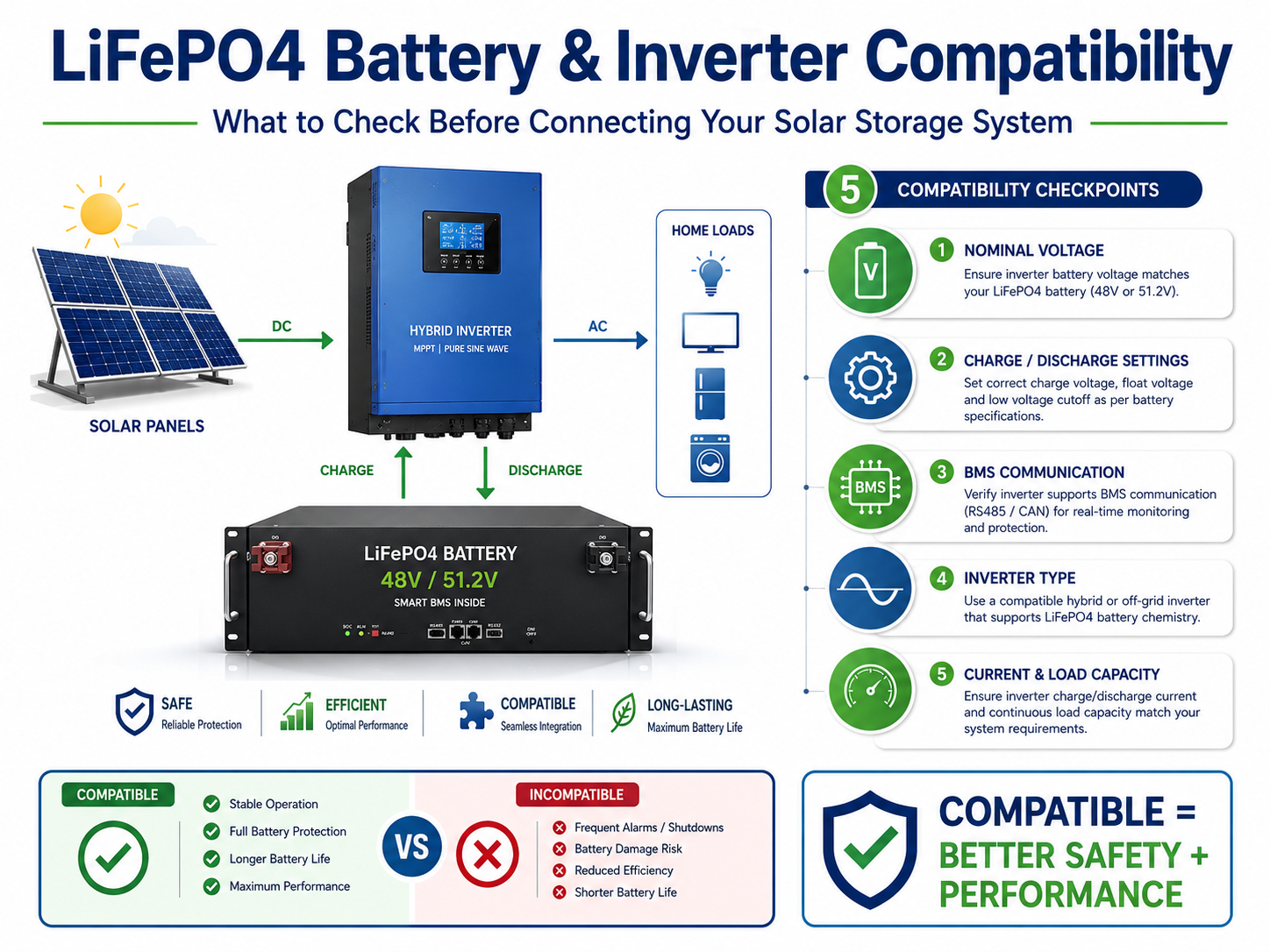
Although many LiFePO4 batteries can operate with a wide range of solar inverters, compatibility depends on much more than battery voltage.
Choosing an incompatible inverter may lead to:
- Incomplete charging
- Frequent alarms
- Communication failures
- Reduced battery life
- Unexpected shutdowns
- Lower system efficiency
This guide explains the key compatibility factors and how to ensure reliable operation before purchasing a battery or inverter.
Why Compatibility Matters
A modern LiFePO4 battery is an intelligent energy storage device rather than a simple DC power source.
Most batteries include a Battery Management System (BMS) that continuously monitors:
- Cell voltage
- Current
- Temperature
- State of Charge (SOC)
- Protection status
To maximize performance, many hybrid inverters communicate directly with the BMS.
Without proper compatibility, the inverter may rely only on voltage measurements, resulting in less accurate charging and discharging control.
Voltage Compatibility Comes First
The first step is verifying that the inverter supports the battery’s nominal voltage.
Typical battery voltages include:
| Battery Voltage | Typical Application |
|---|---|
| 12.8V | RV, Marine, Small Solar |
| 25.6V | Small Off-Grid Systems |
| 48V / 51.2V | Residential & Commercial ESS |
| High Voltage (100V–800V+) | Large Commercial BESS |
Always ensure the inverter’s supported battery voltage range matches the battery specification.
A mismatch can prevent the system from operating correctly.
Battery Chemistry Settings
Many modern hybrid inverters allow users to select different battery types.
Typical options include:
- Flooded Lead-Acid
- AGM
- GEL
- User-Defined
- Lithium
If the inverter includes a dedicated Lithium mode that supports your battery brand or communication protocol, this is usually the preferred option.
When communication is unavailable, the User-Defined mode can often be used by manually entering the battery manufacturer’s recommended charging parameters.
Communication Protocols
Modern lithium batteries commonly communicate with inverters using:
- CAN Bus
- RS485
Communication enables the inverter to receive real-time information such as:
- State of Charge (SOC)
- Battery temperature
- Maximum charge current
- Maximum discharge current
- Alarm and fault status
This allows the inverter to adjust its operation dynamically, improving both safety and battery lifespan.
Why Communication Is Important
Without communication, the inverter estimates battery condition primarily from voltage.
This can result in:
- Less accurate SOC display
- Reduced charging precision
- Delayed fault detection
- Less efficient energy management
Communication is especially valuable for larger residential and commercial energy storage systems.
Charging Voltage Must Match
Even if voltage and communication are compatible, charging parameters must also be configured correctly.
Important settings include:
- Bulk/Absorption Voltage
- Float Voltage (if applicable)
- Low Voltage Cut-Off
- Recharge Voltage
- Maximum Charging Current
Incorrect settings can lead to:
- Undercharging
- Overcharging
- Frequent BMS protection events
- Shortened battery life
Always use the battery manufacturer’s recommended values.
Continuous Current Compatibility
The inverter should also operate within the battery’s current limits.
For example:
Battery:
51.2V
100Ah
Maximum continuous discharge:
100A
Maximum continuous output:
Approximately 5.12kW
Pairing this battery with a much larger inverter does not automatically increase the available battery power.
If higher power is required, consider:
- Larger-capacity batteries
- Parallel battery configurations
- Higher-voltage ESS solutions
Common Compatibility Problems
Problem 1 – Battery Stops Charging at 90%
Possible causes include:
- Incorrect charging voltage
- Communication failure
- Conservative BMS protection settings
Check both the inverter configuration and the communication status.
Problem 2 – SOC Display Is Inaccurate
If the inverter displays 100% while the battery indicates 85%, communication may not be functioning correctly.
Confirm:
- CAN/RS485 cable wiring
- Protocol selection
- Firmware compatibility
Problem 3 – Frequent BMS Alarms
Repeated protection events may indicate:
- Charging current set too high
- Inverter discharge current exceeds battery capability
- Incorrect battery profile
Review the inverter settings against the battery manual.
How to Check Compatibility Before Purchasing
Before ordering a battery or inverter, ask your supplier the following questions:
- Which inverter brands have been tested with this battery?
- Is CAN Bus communication supported?
- Is RS485 communication available?
- Which communication protocol version is used?
- Are firmware updates available if required?
- Can multiple batteries communicate in parallel?
- Is there a recommended inverter settings guide?
Clear answers to these questions can prevent costly commissioning issues later.
Compatibility Checklist
Before installation, verify:
- Battery voltage matches inverter specifications.
- Charge and discharge current limits are compatible.
- Communication protocol is supported.
- Recommended charging parameters are configured.
- Firmware versions are up to date.
- Cables are correctly connected and securely fastened.
A structured pre-installation review greatly reduces the likelihood of startup problems.
HIZN Engineer’s Recommendation
For residential and commercial ESS projects, always choose an inverter that has been successfully tested with the battery model you intend to use.
If communication is available, enable it.
If communication is not available, configure the inverter manually using the charging parameters provided by the battery manufacturer.
Avoid guessing voltage or current settings, as incorrect values can reduce battery lifespan and trigger unnecessary BMS protection.
Frequently Asked Questions
Can any 48V inverter work with a 51.2V LiFePO4 battery?
Not necessarily. The inverter must support the battery’s operating voltage range and charging parameters.
Is CAN better than RS485?
Both are widely used. CAN is often preferred for real-time communication and broad compatibility, while RS485 remains common in many ESS applications.
Can the battery operate without communication?
In many cases, yes. However, manual parameter configuration is required, and some advanced functions may not be available.
What should I do if my inverter does not list my battery brand?
Use the manufacturer’s recommended manual settings if supported, or consult both the inverter and battery suppliers to confirm compatibility before installation.
Conclusion
Successful ESS installations depend on more than selecting a high-quality battery or inverter individually.
Voltage matching, charging parameters, current capability, and communication protocols all contribute to reliable system performance.
By verifying compatibility before purchase and following the manufacturer’s recommendations during installation, users can reduce commissioning problems, improve efficiency, and maximize the service life of their LiFePO4 battery system.