
Introduction
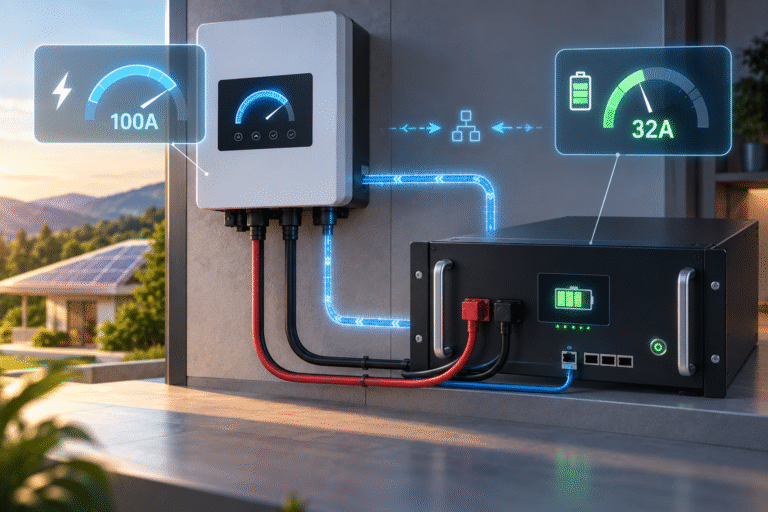
The inverter is configured for:
100A maximum charging current.
The solar system has enough power.
The battery is only at 70% SOC.
But actual charging current is: 32A
The customer asks:
“Why won’t the battery take 100A?”
When an intelligent LiFePO4 battery communicates with an inverter through CAN or RS485, the inverter’s manual current setting is often only one limit.
The battery BMS may dynamically transmit its own charging limits.
Two important concepts are commonly involved:
CCL — Charge Current Limit and CVL — Charge Voltage Limit
These limits can change continuously according to:
- SOC
- Highest cell voltage
- Temperature
- Cell imbalance
- Battery quantity
- BMS protection logic
This means a system configured for 100A does not necessarily charge at 100A all the time.
Often, that is exactly how a properly integrated ESS should behave.
Manual Inverter Setting vs BMS Command
Imagine the inverter setting says: Maximum Battery Charge Current = 100A
This means: The inverter is permitted to provide up to 100A.
It does not necessarily mean: The inverter must always provide 100A.
In closed-loop communication, the BMS may tell the inverter: CCL = 60A
The inverter should then limit charging to approximately 60A.
Later: CCL = 20A
The inverter reduces further.
The lowest applicable limit normally wins.
Think of the Inverter Setting as a Ceiling
Suppose:
Inverter maximum = 100A
BMS CCL = 80A
Available solar = equivalent of 50A
Actual battery charging current may be around: 50A
because solar availability is the smallest limit.
Another situation:
Inverter maximum = 100A
Solar available = 120A
BMS CCL = 40A
Actual charging current should be limited to around: 40A
The battery is now the limiting device.
What Is CCL?
CCL normally means: Charge Current Limit
It tells the inverter how much charging current the battery is currently willing to accept.
The value may be:
- 100A
- 80A
- 50A
- 10A
- 0A
depending on battery condition.
CCL is not necessarily fixed.
It can change during one charging session.
Why Would CCL Change?
A BMS can calculate CCL using several factors.
SOC
Near full charge, the BMS may reduce permitted charging current.
Maximum Cell Voltage
If one cell rises faster than others, CCL can decrease.
Temperature
High or low cell temperature may require lower charging current.
Cell Difference
Large imbalance may cause conservative charging.
Battery Protection Status
Certain warning conditions can reduce or disable charging.
Parallel Battery Availability
A master BMS may adjust total current according to how many battery modules are online.
What Does CCL = 0A Mean?
This is one of the most useful troubleshooting values.
If:
CCL = 0A
the battery is effectively telling the inverter:
Do not charge me right now.
This may be normal when:
- Battery is fully charged
- One cell is at upper limit
- Battery temperature is outside the charging range
Or it can indicate:
- BMS protection
- Communication issue
- Incorrect master/slave configuration
The surrounding data determines the meaning.
CCL = 0A at 100% SOC
Suppose:
SOC = 100%
No alarms
Cell voltages = normal
CCL = 0A
This may simply mean charging is complete.
There is no reason for the inverter to keep forcing current into the battery.
CCL = 0A at 35% SOC
Now suppose:
SOC = 35%
CCL = 0A
This deserves investigation.
Check:
- Battery temperature
- Highest cell voltage
- Alarm code
- Charge MOS/contactor status
- Communication state
A low-SOC battery normally has a reason for requesting zero charge current.
What Is CVL?
CVL normally refers to:
Charge Voltage Limit
The BMS communicates the maximum charging voltage currently allowed.
For example, a 51.2V battery may communicate a voltage target appropriate to its internal charging strategy.
The inverter should not simply keep using an unrelated manual voltage if closed-loop operation is correctly implemented.
Why Both Current and Voltage Limits Are Needed
Charging cannot be controlled by current alone.
Suppose:
Battery can initially accept: 100A
As voltage approaches the upper limit, maintaining 100A would push cells too high.
The BMS or charger therefore needs both:
- Current control
- Voltage control
This is the basis of controlled LiFePO4 charging.
CCL and CVL allow the battery to communicate these changing limits dynamically.
Example of a Normal Charging Session
Consider a 51.2V battery.
Low SOC
SOC = 25%
CCL = 100A
The battery can accept high charging current.
Mid SOC
SOC = 70%
CCL = 100A
Charging remains strong.
Higher SOC
SOC = 93%
One cell approaches upper region.
CCL = 50A
Near Full
SOC = 98%
CCL = 15A
Full
SOC = 100%
CCL = 0A
This type of reduction can be normal.
Actual values depend on the battery design.
Why the Inverter Setting Does Not Override the BMS
A customer may try increasing: 100A → 150A
in the inverter menu.
But if: BMS CCL = 40A
the inverter may continue charging at approximately 40A.
The customer concludes:
“The inverter setting does not work.”
In reality, the closed-loop control is doing its job.
The battery has a lower active limit.
Why Open-Loop Systems Behave Differently
If there is no CAN or RS485 communication, the inverter does not receive dynamic BMS limits.
The system may instead use:
- Manually configured voltage
- Manually configured current
The BMS remains a protection layer.
If the inverter continues charging beyond acceptable conditions, the BMS may eventually:
- Open charge MOS
- Open contactor
- Trigger protection
This is a harder intervention than smooth dynamic current reduction.
Closed-Loop Charging Can Reduce BMS Trips
Consider a high cell approaching its limit.
Open-Loop System
Inverter continues:
100A
until BMS threshold is reached.
Then:
Battery disconnects charging.
Closed-Loop System
BMS sends:
100A → 60A → 30A → 10A
The inverter gradually reduces charging.
This can allow the battery to complete charging more smoothly.
But Communication Must Be Correct
A CAN cable being physically connected does not guarantee correct communication.
Both devices must agree on:
- Protocol
- Baud rate where applicable
- CAN IDs
- Message format
- Pinout
- Battery addressing
An incorrect protocol can create:
- Wrong SOC
- Wrong current limit
- Charging disabled
- Inverter battery fault
Protocol Names Can Be Misleading
An inverter may offer options such as:
- Pylon
- Lithium
- CAN
- BMS
- User Defined
These labels do not guarantee compatibility with every battery.
Battery suppliers often implement protocols compatible with specific inverter families.
The correct protocol selection should be confirmed before commissioning.
What Is DCL?
Another common BMS parameter is:
DCL — Discharge Current Limit
CCL controls charging.
DCL controls discharging.
For example:
CCL = 20A
DCL = 150A
means:
The battery is currently willing to accept only limited charging current but can still provide substantial discharge current.
This is entirely possible.
CCL and DCL Can Be Very Different
Near full charge:
- CCL may be low
- DCL may remain high
Near low SOC:
- CCL may be high
- DCL may be low
This makes sense.
Near full SOC, the battery does not need more charging but can discharge.
Near low SOC, charging is desirable while heavy discharge may need to be limited.
Temperature Can Change CCL Dramatically
Suppose normal CCL:
100A
Battery temperature rises.
The BMS may reduce:
100A → 70A → 40A
If temperature continues increasing, it may eventually reach:
0A
This protects the battery.
Therefore, when a customer reports reduced charging current, check:
Has CCL changed at the same time?
If yes, investigate why the BMS changed it.
Low Temperature Works Similarly
A cold battery may communicate:
CCL = 0A
while still allowing some discharge.
The inverter may show:
- Solar available
- Battery connected
- No charging current
This is not necessarily an inverter fault.
The BMS may be intentionally prohibiting charging.
Cell Voltage Can Reduce CCL Before Pack Voltage Looks High
This is another major advantage of BMS-controlled charging.
The inverter sees total battery voltage.
The BMS sees every cell.
One cell may approach its upper limit while pack voltage still appears acceptable.
The BMS can reduce CCL before a pack-level voltage setting would react.
Parallel Battery Banks Need Coordinated CCL
Consider four 51.2V 100Ah modules.
Each module can accept: 50A
The theoretical combined capability could be: 200A
if all four modules are:
- Online
- Healthy
- Similar SOC
- Properly communicating
Now one battery goes offline.
Available bank charging capability may fall.
A master BMS should ideally communicate an updated total current limit.
The inverter may therefore reduce charging automatically.
Why Current Can Suddenly Fall After One Module Disconnects
Before:
4 batteries online
Total CCL = 200A
One module develops a temperature alarm.
Now only three remain available.
Master BMS may reduce:
CCL = 150A
Actual charging power decreases.
The battery bank is protecting the remaining modules from excessive current.
Addressing Matters in Parallel Banks
Multiple battery modules may require:
- DIP switch addressing
- Automatic addressing
- Master/slave assignment
Incorrect addressing can cause:
- Missing modules
- Wrong reported capacity
- Incorrect current limits
- Communication instability
A four-battery bank where the master only sees two batteries may communicate an unnecessarily low CCL.
Termination Resistors Can Matter
CAN and RS485 networks may require proper bus termination.
Incorrect termination can cause communication problems, especially with:
- Long cables
- Multiple modules
- Electrically noisy environments
Symptoms may include:
- Intermittent communication
- Changing SOC
- Charging-current changes
- Modules disappearing
Follow the battery and inverter wiring diagram.
Why CCL Can Fluctuate
A customer may see:
80A → 40A → 60A → 20A
This does not automatically indicate a fault.
Possible reasons include:
- Cell voltage changes
- Temperature
- Balancing
- SOC calculation
- Modules joining/leaving the communication network
The correct question is:
What other BMS parameter changed at the same time?
Log Several Parameters Together
When diagnosing CCL changes, record:
- SOC
- Pack voltage
- Highest cell voltage
- Lowest cell voltage
- Cell delta
- Temperature
- CCL
- CVL
- DCL
- Alarm code
- Number of online battery modules
Time-correlated data is much more useful than one screenshot.
Example: Normal CCL Reduction
SOC: 97%
Max cell: approaching charge target
Cell delta: moderate
Temperature: normal
CCL: 15A
No alarm
This may be completely normal near-full charging behavior.
Example: Temperature Derating
SOC: 60%
Max cell: normal
Temperature: elevated
CCL: 30A
The battery is likely reducing charge current because of temperature.
Example: Possible Communication Problem
SOC: 45%
Temperature: normal
Cells: normal
CCL alternates:
100A → 0A → 100A
Communication alarms appear.
This suggests checking:
- Protocol
- Cable
- termination
- master/slave configuration
rather than changing battery voltage settings.
Inverter Screens May Not Show CCL
Some inverters display only:
- Battery charge power
- SOC
- Voltage
The BMS app or PC software may provide much more detail.
For difficult charging problems, request BMS-level data.
Firmware Can Affect Compatibility
Battery and inverter manufacturers occasionally update communication behavior.
Firmware differences can affect:
- SOC reporting
- Current limits
- Protocol interpretation
If hardware and wiring are correct but communication behavior is abnormal, confirm approved firmware compatibility with the manufacturers.
Do not update firmware randomly without checking compatibility.
Manual Mode Can Be Useful for Diagnosis
In some systems, technicians can temporarily test approved open-loop settings to distinguish:
- Communication problem
from
- Electrical charging problem
However, this should be done only within manufacturer-approved battery voltage and current limits.
Do not bypass BMS protection.
For Distributors: CCL Is One of the First Values to Request
When a customer says:
“My 100A charger only gives 30A.”
Ask for:
- SOC
- CCL
- CVL
- Maximum cell voltage
- Battery temperature
- BMS alarms
- Inverter model
- Number of parallel batteries
If CCL itself is 30A, the inverter may be behaving exactly as requested.
The next task is determining why the BMS selected 30A.
Do Not Tell the Customer to Increase Current Blindly
If the BMS has reduced current because of:
- High cell voltage
- Temperature
- Imbalance
raising the inverter’s manual maximum does not solve the problem.
It may have no effect—or create additional problems if communication later drops out.
Find the limiting condition first.
BMS Dynamic Limits Are a Feature, Not a Defect
A sophisticated ESS should not use the same charging current under every condition.
Battery conditions change.
The BMS can adapt charging according to:
- Temperature
- Cell voltage
- SOC
- Module availability
This can improve system stability and reduce hard protection events.
Conclusion
When an inverter is configured for 100A but the battery charges at only 20A, 30A or 50A, the inverter may not be the limiting device.
In a closed-loop LiFePO4 ESS, the BMS can dynamically communicate:
- CCL — Charge Current Limit
- CVL — Charge Voltage Limit
- DCL — Discharge Current Limit
These values help the inverter adapt charging to the battery’s real condition.
The correct troubleshooting question is therefore:
“What charging limit is the BMS currently requesting, and why?”
HIZN LiFePO4 energy storage batteries support intelligent BMS monitoring and CAN/RS485 communication on applicable 48V/51.2V energy storage models.
If your inverter charging current is lower than its configured value, send us the battery BMS data, CCL/CVL values, inverter model and communication protocol setting. We can help identify whether the limit is caused by normal BMS control, system configuration or communication.